
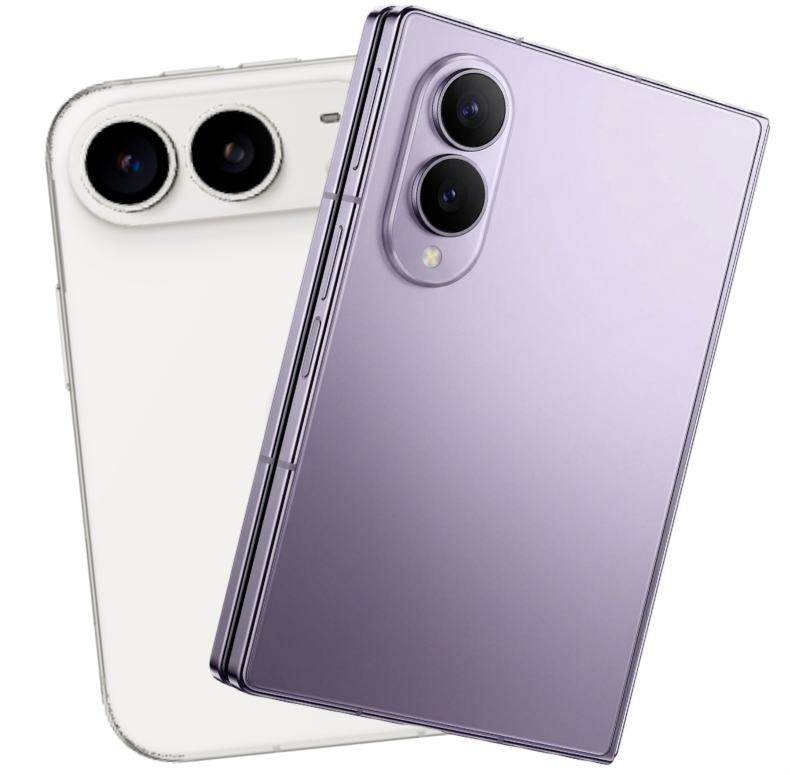
The complaints started almost as soon as the iPhone Duo landed.
Take it outside, people said, and the screen just can’t keep up with the Galaxy Z Fold 8. Never mind that both phones claim the same 3,000 nits of peak brightness.
And then there are the cameras.
So both phones went to downtown Jacksonville, Oregon, a little gold-rush town with brick storefronts and, on this day, a bright, unforgiving sun. Same spots. Same shots.
The screen question got answered. The camera question got… complicated.
And one of Samsung’s biggest bragging rights over the Duo turned out to have a simple fix.
The Outdoor Screen Debate: Fact or Fiction?
With the sun at the phones’ backs, both screens stay bright and readable. Neither pulls ahead, and both show a bit of reflection. [1:12]
Tilt them so the sun is shining directly onto the glass, and both are still very viewable.
Open them up, and the Samsung’s inner screen is a bit easier to see in direct sun and a little clearer in the shade. The Duo’s nano-texture finish gives its image a slightly more muted look. [12:43]
But a small turn of the wrist is all the Duo needs. At a slight angle, it’s perfectly clear.
So is the iPhone Duo hard to use outside? No. Is the Z Fold 8 a touch better in harsh light? Yes, a touch. That’s the honest version.
Daytime Photos: Closer Than You’d Think
On the ultra-wide cameras, the results were basically identical. [1:52]
At 1x, you can hardly tell them apart. The Z Fold leans a little yellow, and the iPhone pulls more green out of the trees.
Crop in, and both read the Jackson Mining Company sign easily. The Samsung lets in a little more light, so the shadows and stonework come through a bit clearer. [2:47]
Then comes 2x, marketed as optical-quality zoom. Here’s the thing… it looks almost exactly like cropping the 1x shot. It’s just a sensor crop, and you’re not getting a better image out of it on either phone. [3:12]
Zoom: Where Samsung Starts to Pull Ahead
At 4x, the gap starts to show. The Boomtown Saloon sign across the street and the brickwork around it are a little crisper on the Samsung. Overall the two are still close. [3:51]
One catch with the Samsung shows up across the whole set: it tends to blow out the sky above the mountains. The iPhone adds a slight yellow cast, visible in the sidewalk stripe.
At 10x, Samsung clearly wins. The building lights, the signage, even an old barrel out front look cleaner, likely thanks to some AI processing the iPhone isn’t doing. [4:47]
Neither one is a zoom monster. But if you have to push in, the Z Fold 8 is the one to grab.
Shooting Into the Sun: The Tables Turn
Point both phones toward the sun, and things change. [5:18]
The Samsung picks up sun rays and some lens flare. The iPhone image is cleaner and pulls more detail out of the shadows on a dark building. Point, Apple.
At 2x, the iPhone stays clearer while the Z Fold looks a little foggy. It just doesn’t handle the backlight as well. [5:46]
But at 10x, it flips again. The South Stage sign is easier to read on the Z Fold. Its shot runs a little bright, but that’s fixable in editing. The iPhone’s 10x is simply a bit blurry. [6:02]
Portraits: A Split Decision
Up close, the Samsung takes it. It’s 50MP against 48MP, so the hardware isn’t the difference, but the Samsung shot is a little clearer and more colorful, with more natural background blur. [6:27]
The iPhone’s portrait looks more processed, blurring the tree overhead into mush. You’ll also notice the Samsung frames a little wider in every shot.
Then turn around with the sun directly behind you, and Samsung washes the sky out to pure white. The iPhone keeps the blue. [7:18]
Step back a little farther, and the iPhone wins again, with smoother, more even background blur at that distance. [7:31]
Close-ups go to Samsung. Backlit and distance portraits go to iPhone.
Night Shots: Not Even Close
After dark, with both phones on a tripod, the ultra-wides start out fairly even. The iPhone shows more noise in the sky, while the Samsung leans noticeably yellow. Call it a toss-up. [7:50]
Then switch to the main cameras, and it’s a different story.
The iPhone flares every light in the frame, and crop in and everything washes out. It’s the same issue on the iPhone Pro. The Samsung keeps those lights under control. [8:16]
There’s no dedicated Night mode to switch to on the iPhone, either. It just shows a moon icon and takes a longer exposure. And with both phones on a tripod, the blur isn’t from shaky hands. It’s the camera.
At 10x at night, neither phone is something you’d want to rely on. But this time it’s the iPhone that turns everything yellow, and the Samsung is far better. [9:21]
For night photos, it’s Samsung all the way.
Video and Selfies: Each Phone Has a Trick
Shooting 4K, the two are remarkably even, from shadow into sunlight and zooming through 2x, 4x and 6x. Interesting, given how much the 4x photos differed. [9:51]
Selfie video is where each pulls a trick. The Samsung can switch cameras mid-recording. The iPhone can shoot a landscape selfie while held upright, fitting a lot more into the frame. That’s a really nice bonus. [11:31]
One quirk applies to both: hold them open in landscape and you get portrait video. You have to hold them upright to get landscape. [12:19]
Night selfies are fine on both, the Samsung maybe a hair clearer. [14:26] But the iPhone has an odd habit: little floating dots near lights in night footage. Call them fireflies. [14:58]
The Hidden Fix: Make the Duo Lock When You Close It
One big knock on the Duo: the Z Fold 8 lets you choose what happens when you close it, including shutting the screen off. The Duo just carries whatever was open over to the outer screen.
But there is a way around it.
Swipe down to search, open Shortcuts, and create a new one by simply describing what you want. Ask it to open Mail when the phone closes, and it builds the shortcut. Close the phone, and Mail pops up. [16:15]
Better yet, set it to lock the phone. Close it, and the screen goes dark, perfect when someone walks up and you want privacy. With an Apple Watch, getting back in is just a swipe. [15:32]
One of Samsung’s biggest advantages, gone with a single shortcut.
So What’s the Verdict?
On the outdoor screen, the internet got it wrong. The Z Fold 8 has a slight edge in direct sun, but the Duo is clear and usable outside.
The cameras split. Daylight at 1x and 2x is a tie. The iPhone does better into the sun and with backlit and distance portraits. The Samsung takes long zoom, close-up portraits and, above all, night photography.
Shoot a lot after dark or lean on zoom? The Galaxy Z Fold 8 is the better camera. Want the iPhone ecosystem and better backlight handling? The Duo holds its own, and its landscape selfie trick is a genuine perk.
And that close-to-lock feature? One quick shortcut, and the Duo has it too.
The screen panic? Overblown.
The camera battle? Closer than expected… until the sun goes down.
Then it’s Samsung’s night.